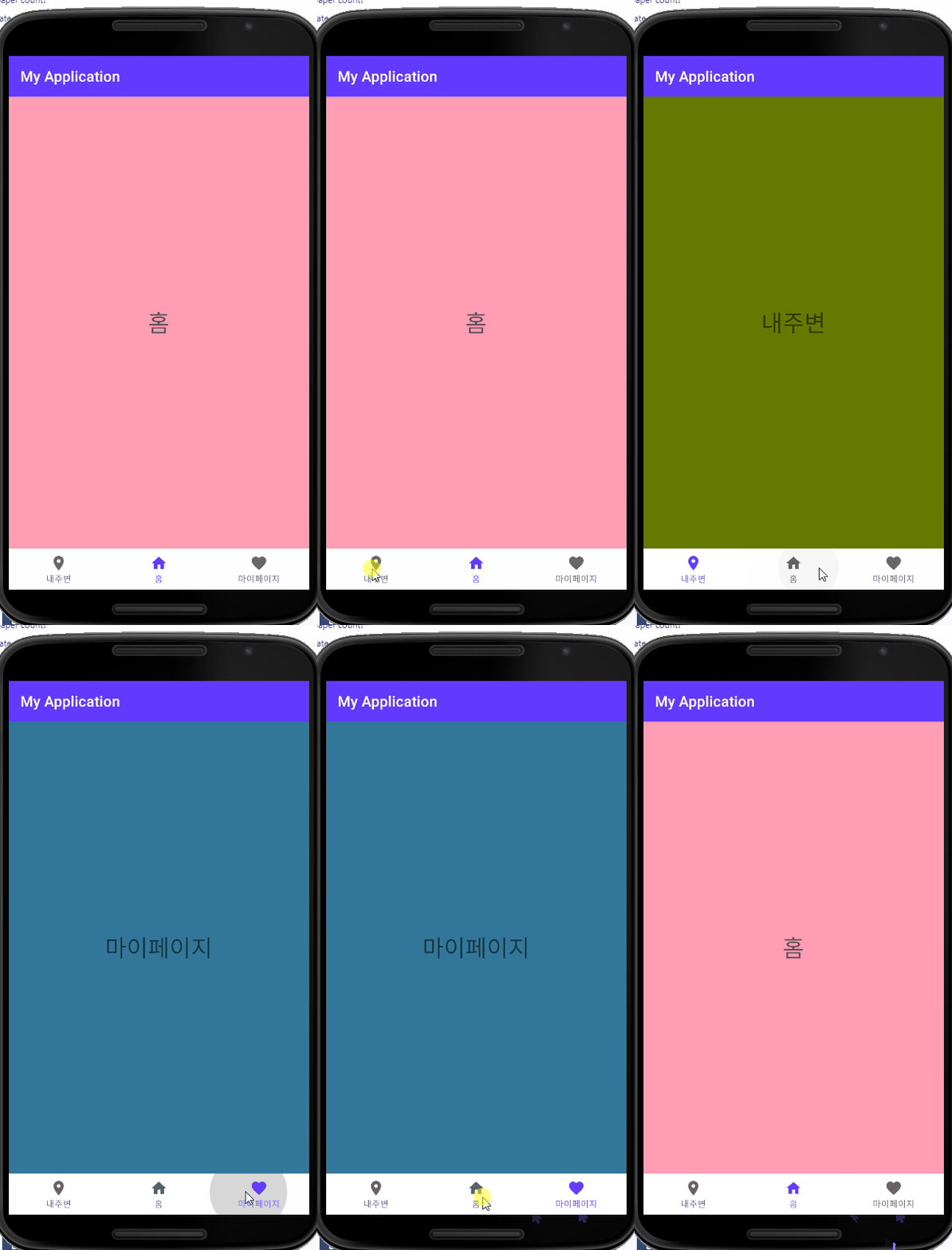
Demo
구성
- activity
- fragment
- layout
- menu
- header (굳이 필요없음)
- [ManiActivity.java]
package com.sjcoding.krhana;

import androidx.annotation.NonNull;
import androidx.appcompat.app.AppCompatActivity;
import androidx.drawerlayout.widget.DrawerLayout;
import androidx.fragment.app.Fragment;

import android.os.Bundle;
import android.view.MenuItem;
import android.view.MotionEvent;
import android.view.View;
import android.widget.Button;

import com.google.android.material.bottomnavigation.BottomNavigationView;
import com.sjcoding.krhana.fragment.BlogFragment;
import com.sjcoding.krhana.fragment.BoardFragment;
import com.sjcoding.krhana.fragment.BusinessFragment;
import com.sjcoding.krhana.fragment.HomeFragment;
import com.sjcoding.krhana.fragment.PhotoFragment;

public class MainActivity extends AppCompatActivity {
    private BottomNavigationView bottomNavigationView;

    @Override
    protected void onCreate(Bundle savedInstanceState) {
        super.onCreate(savedInstanceState);
        setContentView(R.layout.activity_main);

        bottomNavigationView = findViewById(R.id.nav_view);
        // 클릭 리스너
        bottomNavigationView.setOnNavigationItemSelectedListener(navListener);
        // 처음 선택된 화면
        getSupportFragmentManager().beginTransaction().replace(R.id.fragment_container, new HomeFragment()).commit();
        bottomNavigationView.setSelectedItemId(R.id.nav_home);
    }

    private BottomNavigationView.OnNavigationItemSelectedListener navListener
            = new BottomNavigationView.OnNavigationItemSelectedListener() {

        @Override
        public boolean onNavigationItemSelected(@NonNull MenuItem item) {
            Fragment selectedFragment = null;
            switch(item.getItemId()) {
                case R.id.nav_home:
                    selectedFragment = new HomeFragment();
                    break;
                case R.id.nav_board:
                    selectedFragment = new BoardFragment();
                    break;
                case R.id.nav_business:
                    selectedFragment = new BusinessFragment();
                    break;
                case R.id.nav_link:
                    selectedFragment = new BlogFragment();
                    break;
                case R.id.nav_photo:
                    selectedFragment = new PhotoFragment();
                    break;
            }

            getSupportFragmentManager().beginTransaction().replace(R.id.fragment_container, selectedFragment).commit();
            return true;
        }
    };
}
- [HomeFragment.java, LocationFragment.java, FavoritesFragment.java]
package com.sjcoding.myapplication;

import android.os.Bundle;
import android.view.LayoutInflater;
import android.view.View;
import android.view.ViewGroup;

import androidx.annotation.NonNull;
import androidx.annotation.Nullable;
import androidx.fragment.app.Fragment;

public class HomeFragment extends Fragment {
    @Nullable
    @Override
    public View onCreateView(@NonNull LayoutInflater inflater, @Nullable ViewGroup container, @Nullable  Bundle savedInstanceState) {
        return inflater.inflate(R.layout.fragment_home, container, false);
    }
}
- [activity_main]
<?xml version="1.0" encoding="utf-8"?>
<RelativeLayout xmlns:android="http://schemas.android.com/apk/res/android"
    xmlns:app="http://schemas.android.com/apk/res-auto"
    xmlns:tools="http://schemas.android.com/tools"
    android:id="@+id/drawer_layout"
    android:layout_width="match_parent"
    android:layout_height="match_parent"
    tools:context=".MainActivity">

   <include layout="@layout/header"
        android:id="@+id/header_view"/>

   <FrameLayout
        android:id="@+id/fragment_container"
        android:layout_width="match_parent"
        android:layout_height="match_parent"
        android:layout_below="@id/header_view"
        android:layout_above="@id/nav_view"
        >

    </FrameLayout>
    <com.google.android.material.bottomnavigation.BottomNavigationView
        android:layout_width="match_parent"
        android:layout_height="wrap_content"
        android:layout_alignParentBottom="true"
        app:menu="@menu/menu_bottom"
        android:background="?android:attr/windowBackground"/>

</RelativeLayout>
- [fragment_home.xml, fragment_favorites.xml, fragment_location.xml]
<?xml version="1.0" encoding="utf-8"?>
<RelativeLayout xmlns:android="http://schemas.android.com/apk/res/android"
    android:layout_width="match_parent"
    android:layout_height="match_parent"
    android:background="@android:color/holo_red_light">

    <TextView
        android:layout_width="wrap_content"
        android:layout_height="wrap_content"
        android:text="홈"
        android:textSize="32dp"
        android:layout_centerInParent="true"/>
</RelativeLayout>
- [menu_bottom.xml]
<?xml version="1.0" encoding="utf-8"?>
<menu xmlns:android="http://schemas.android.com/apk/res/android">
    <item
        android:id="@+id/nav_board"
        android:title="소식"
        android:icon="@drawable/board"/>
    <!--<item
        android:id="@+id/nav_business"
        android:title="주요사업"
        android:icon="@drawable/home"/>-->
    <item
        android:id="@+id/nav_business"
        android:title="주요사업"
        android:icon="@drawable/business"/>
    <item
        android:id="@+id/nav_home"
        android:title="홈"
        android:icon="@drawable/home"/>
    <item
        android:id="@+id/nav_link"
        android:title="블로그"
        android:icon="@drawable/link"/>
    <item
        android:id="@+id/nav_photo"
        android:title="자료"
        android:icon="@drawable/photo"/>
</menu>
- [header.xml]
<?xml version="1.0" encoding="utf-8"?>
<LinearLayout xmlns:android="http://schemas.android.com/apk/res/android"
    android:layout_width="match_parent"
    android:layout_height="100dp"
    android:orientation="vertical"
    android:background="@color/primary"
    android:gravity="bottom"
    android:padding="20dp">
    <ImageView
        android:layout_width="120dp"
        android:layout_height="30dp"
        android:src="@drawable/krhana_new"/>
    <TextView
        android:layout_width="wrap_content"
        android:layout_height="wrap_content"
        android:text="남북을 잇고 평화를 만들다. 시민이 만드는 통일이야기"
        android:textSize="16dp"/>
    <TextView
        android:layout_width="wrap_content"
        android:layout_height="wrap_content"
        android:text="https://www.krhana.org/"
        android:textSize="8dp"/>

</LinearLayout>
![[Android/Java] Fragment Bottom Navigation view](https://img1.daumcdn.net/thumb/R750x0/?scode=mtistory2&fname=https%3A%2F%2Fblog.kakaocdn.net%2Fdna%2FerUlIW%2Fbtq8mepzvsh%2FAAAAAAAAAAAAAAAAAAAAAMlXlM9U7fnKxPF2kWXjkBc7Ub_uqVfM60M_wxOnEfF8%2Fimg.gif%3Fcredential%3DyqXZFxpELC7KVnFOS48ylbz2pIh7yKj8%26expires%3D1767193199%26allow_ip%3D%26allow_referer%3D%26signature%3D5V3r1OGlIM5WgV9GDQTOzV9xZUw%253D)